Azure has four different messaging services, and picking the wrong one is one of the most common mistakes beginners make. Service Bus is the one you reach for when messages are too important to lose — order processing, financial transactions, anything where "it probably got delivered" isn't good enough.
This guide breaks down what Service Bus does, how it works, and when you should use it instead of the other options.
Think of It Like a Post Office
Imagine you need to send an important document to someone. You could slide it under their door and hope they're home. Or you could send it through a post office — it gets tracked, held securely until the recipient picks it up, and you get confirmation that it was delivered.
Azure Service Bus is the post office. It sits between your applications and guarantees that messages get delivered, even if the receiving application is temporarily offline. The message waits in the queue until someone picks it up.
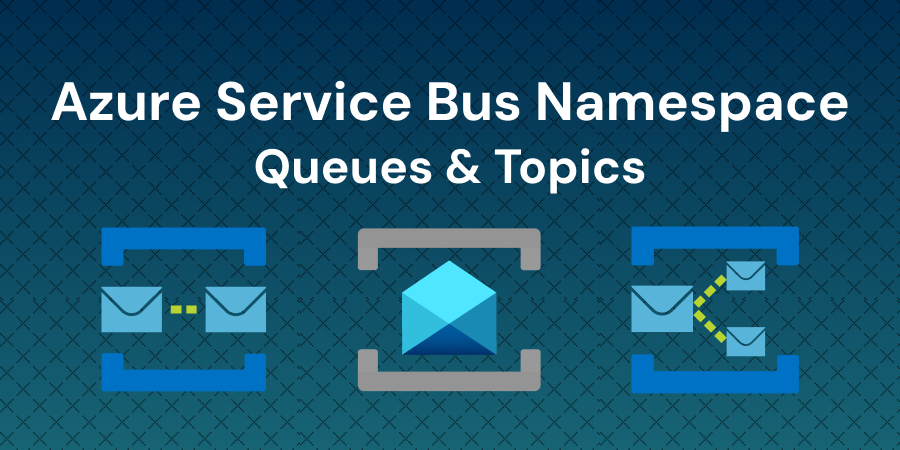
Service Bus has two delivery patterns:
- Queues work like a mailbox. One sender drops a message in, one receiver picks it up. First in, first out.
- Topics work like a newsletter. One sender publishes a message, and every subscriber gets their own copy.
Queues — One Sender, One Receiver
A queue is the simplest pattern. Application A sends a message to the queue. Application B picks it up when it's ready. If Application B is offline, the message waits — it doesn't disappear.
Messages are stored durably in triple-redundant storage, spread across availability zones if your namespace is zone-enabled. That means even if part of Azure's infrastructure goes down, your messages survive.
Use queues when:
- You're processing orders or transactions where every message must be handled exactly once
- You're decoupling two services so they don't need to be online at the same time — the queue absorbs the gap
- You're distributing work across multiple workers — Service Bus ensures each message goes to only one worker, preventing duplicate processing
Service Bus uses pull-based delivery. Your receiver asks for messages when it's ready, rather than getting bombarded with pushes it can't handle. This naturally prevents overload.
Topics and Subscriptions — One Message, Many Receivers
Topics let you send one message to multiple receivers. Each receiver creates a subscription to the topic and gets its own copy of every message.
Here's a real-world example. A customer places an order on an e-commerce site. That single "order placed" message gets published to a topic. Three subscriptions pick it up:
- The payment service charges the customer's card
- The inventory service reduces the stock count
- The shipping service schedules the delivery
One message, three independent actions. If the shipping service goes down for maintenance, its messages wait in its subscription until it comes back. The other two services aren't affected.
Subscriptions also support filters. You can configure a subscription to only receive messages that match certain criteria — for example, only orders over $100 or only orders from a specific region.
How Service Bus Compares to the Other Three
Azure has four messaging services. Each one solves a different problem.
| Service Bus | Storage Queues | Event Grid | Event Hubs | |
|---|---|---|---|---|
| What it does | Enterprise message broker with guaranteed delivery | Simple, high-volume queue storage | Event routing and notification | High-throughput event streaming |
| Best for | Orders, transactions, workflows that need reliability | Simple task queues where volume matters more than features | Reacting to status changes (resource created, blob uploaded) | Telemetry, logs, real-time analytics at massive scale |
| Delivery | Pull-based | Pull-based | Push-based | Pull-based (stream) |
| Ordering | FIFO guaranteed (with sessions) | No guarantee | No guarantee | Per-partition ordering |
| Max message size | 256 KB (Standard), 100 MB (Premium) | 64 KB | 1 MB | 1 MB |
| Transactions | Yes | No | No | No |
| Dead-letter queue | Yes | No | Yes | No |
| Pricing | $0.05/M ops (Basic), $10/mo + $0.80/M (Standard) | ~$0.0004/10K operations | $0.60 per million operations | Per throughput unit |
The short version: If your messages represent work that must be completed reliably (orders, payments, job queues), use Service Bus. If you're streaming millions of telemetry events per second, use Event Hubs. If you're reacting to something that happened (a file was uploaded, a VM was created), use Event Grid. If you need a cheap, simple queue and don't need advanced features, use Storage Queues.
What Does It Cost?
Service Bus has three pricing tiers:
- Basic — $0.05 per million operations. Queues only, no topics. Good for experimenting, but limited.
- Standard — $10/month base charge with the first 13 million operations included. After that, $0.80 per million operations. Supports both queues and topics. This is the tier most workloads start on.
- Premium — Dedicated resources with a flat daily rate per messaging unit. No per-message charges. Built for production workloads that need predictable performance and network isolation.
For most beginner and learning workloads, Standard is the right starting point. The $10/month base with 13 million included operations covers a lot of ground before you pay anything extra.
Three Mistakes Beginners Make
Using Service Bus when Storage Queues would be cheaper. If you just need a simple task queue — process this image, send this email — and you don't need ordering guarantees, transactions, or dead-letter handling, Storage Queues cost a fraction of Service Bus. Don't pay for enterprise features you won't use.
Choosing Event Hubs for order processing. Event Hubs is built for streaming millions of events per second, not for processing individual messages reliably. It doesn't support message-level acknowledgment or dead-letter queues. If each message represents a transaction that must complete, Service Bus is the right tool.
Ignoring the dead-letter queue. When a message can't be delivered or processed after multiple attempts, Service Bus moves it to a dead-letter queue instead of dropping it. Beginners often don't know this queue exists. Check it regularly — those messages represent failed work that needs attention.
When You'll Actually Need It
Start with the simplest question — what kind of message are you sending?
- "Process this order" → Service Bus queue. Every message matters.
- "Something happened, react to it" → Event Grid. Lightweight notifications.
- "Here's a stream of data points" → Event Hubs. High-throughput ingestion.
- "Add this to the to-do pile" → Storage Queue. Simple and cheap.
If you're building anything where losing a message means losing money, losing data, or breaking a workflow, Service Bus is where you start.
Now that you understand the basics:
- Read the official overview on Microsoft Learn for the complete feature list
- If you're studying for AZ-104 or AZ-305, messaging services are a common exam topic — know when to pick each one
- Next up: "Azure Messaging Services Compared" goes deeper into the trade-offs between all four services
Ready to Master Cloud Engineering?
Get access to hands-on labs, expert-led courses, and a supportive community.
Practice it hands-on
Labs where you can apply what this article covers, in a real environment.
Build an Event-Driven Messaging Solution with Azure Service Bus
Create Service Bus queues and topics, build producer-consumer messaging, implement subscription filters, and handle dead-letter queues.
cloudlearn.ioStart lab
Creating a Web App on Azure App Service using Azure Portal
Learn how to create, configure, and deploy a web application using Azure App Service through the Azure Portal's interface.
cloudlearn.ioStart lab
Container Apps KEDA Scaling with Service Bus Queue Workers
Scale Azure Container Apps from zero to five replicas using KEDA and Service Bus queue message count as the scaling trigger.
cloudlearn.ioStart lab